Aiserveon
Understanding what an h100 server manufacturer does requires more than recognizing the NVIDIA H100 name. A manufacturer designs, builds, tests, and supports complete computing systems around H100 GPUs. It may offer PCIe or SXM configurations, depending on workload and platform requirements. These systems include CPUs, memory, networking, storage, power supplies, and cooling components. Every part matters.
The physical details are important. A high-density server can generate substantial heat inside a compact rack. Engineers must manage airflow, GPU spacing, power delivery, and firmware compatibility. Reliable manufacturers test systems under sustained artificial intelligence and high-performance computing workloads. They check temperature stability, error rates, network performance, and service procedures before shipment. Good documentation should identify supported configurations, warranty coverage, and replacement timelines.
An h100 server manufacturer is not always the same as a distributor or system reseller. A reseller may source a finished platform, while a manufacturer often controls assembly and validation. The distinction can affect customization, troubleshooting, and long-term support. Ask who performs burn-in testing. Ask how failed GPUs are handled. Ask whether technicians can provide remote diagnostic assistance.
No supplier is flawless. A polished datasheet cannot prove operational reliability. Buyers should compare independent test results, customer references, certifications, and support response records. They should also review software compatibility, especially for CUDA-based applications and containerized workloads. Real experience matters here. A system that performs well in a laboratory may behave differently in a crowded data center.
The best evaluation balances performance with maintainability, energy use, security, and total ownership cost. That balance is easy to miss. Choosing an h100 server manufacturer should therefore involve evidence, technical questions, and cautious verification rather than marketing language alone.
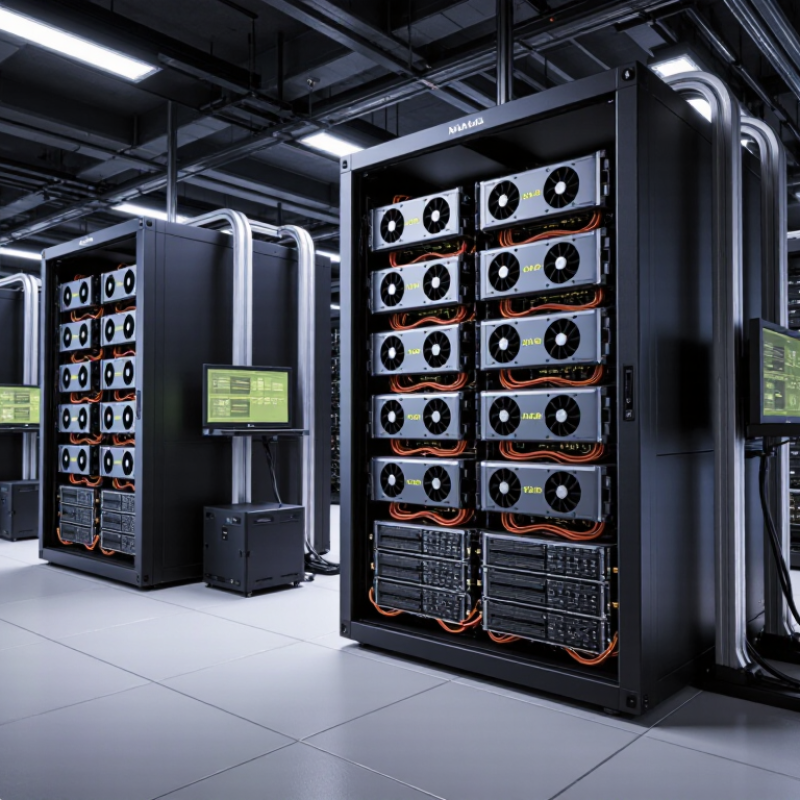
An H100 server manufacturer is more than a company that installs accelerators into a metal chassis. It designs, assembles, validates, and supports complete systems for demanding AI workloads. The manufacturer selects compatible processors, memory, storage, networking, power supplies, and cooling equipment. Every choice affects performance and stability.
In practice, engineers must manage heat at the rack level. A server may require liquid cooling, carefully balanced airflow, and high-capacity power distribution. Validation often includes firmware checks, stress testing, thermal monitoring, and workload benchmarking. These tests expose weak connections, unstable memory, and unexpected throttling before delivery. Documentation matters too. Reliable manufacturers provide serial tracking, configuration records, service procedures, and clear warranty terms.
The supply chain definition is not always clean. Some companies assemble systems, while others design platforms and outsource production. Both may call themselves manufacturers. That wording can confuse buyers. A credible supplier should explain which work happens internally and which work depends on partners. It should also demonstrate experience with deployment, maintenance, and secure data-center operations.
Performance claims need careful review. Peak specifications can look impressive, yet real workloads may reveal limitations in software, cooling, or network design. Buyers should request test conditions, delivery timelines, replacement policies, and compliance evidence. Small omissions create large problems. Even a well-built system can underperform when the surrounding power and networking infrastructure is overlooked.
An H100 server manufacturer builds and validates systems designed around high-performance GPU computing. The critical specification is often 80GB of HBM3 memory. HBM3 places data close to the processor, reducing delays during large model training and scientific simulation. The memory capacity helps keep bigger datasets resident, instead of repeatedly moving them through slower system memory.
Bandwidth matters just as much. A 3.35TB/s memory bandwidth can feed the GPU at remarkable speed. In practical testing, this supports faster tensor operations, especially when workloads reuse large matrices. It does not guarantee equal application performance. Software efficiency, batch size, interconnect design, and CPU balance still matter. Numbers can mislead.
A reliable manufacturer should document the exact GPU form factor and configuration. Some systems use different cooling methods and power profiles. Air cooling may suit a smaller deployment, while dense installations often need liquid-assisted designs. Technicians should inspect airflow, rack spacing, power delivery, and thermal readings under sustained load. A short benchmark is not enough. I prefer repeatable tests lasting several hours. That exposes throttling, unstable drivers, or inadequate cooling. One overlooked detail is memory utilization. An 80GB card can still fail to meet expectations when the application fragments memory or copies data inefficiently. Specifications provide a strong starting point, not a complete performance promise.
A manufacturer is not merely an assembler. It engineers the chassis, motherboard, power system, cooling, firmware, and support around accelerator requirements. For an eight-GPU H100 server, that responsibility becomes substantial. Each GPU can use a 700W SXM module. Eight modules may demand about 5.6kW before CPUs, memory, storage, and fans are counted.
NVLink creates high-bandwidth GPU communication inside the server. Its topology matters. Poor placement or unsuitable switching can increase communication paths and reduce scaling efficiency. A capable manufacturer maps the interconnect carefully, validates peer-to-peer transfers, and tests collective workloads under sustained load. Short benchmark runs can look impressive. Long jobs reveal more. Heat soak, throttling, and uneven airflow often appear after hours, not minutes. Rack design also matters because a dense system may require specialized power distribution and facility cooling.
In practical evaluation, I inspect power telemetry, inlet temperature, fan behavior, error logs, and recovery procedures. I also ask whether technicians tested real training data, not only synthetic benchmarks. That distinction is important. A server may pass acceptance testing yet struggle in a warm data center. I have seen specifications hide small assumptions, especially around peak power and networking. They deserve review. Reliable manufacturing includes documented tolerances, repeatable assembly, firmware control, and clear replacement processes. Operational details decide whether eight accelerators remain productive.
An H100 server manufacturer does more than install accelerators in a chassis. It may design the server, validate thermal performance, and prepare the system for production use. Some manufacturers build complete platforms, while others integrate certified components into custom configurations. This distinction matters during deployment.
Cooling is often the most visible responsibility. A dense eight-accelerator server can produce substantial heat in a small space. Manufacturers may select high-performance fans, cold plates, liquid loops, or rear-door heat exchangers. They should also test airflow under realistic workloads, not only during short laboratory checks. A temperature graph can look excellent. Cable placement may still block airflow.
Networking requires equal attention. The manufacturer must match network adapters, switching speeds, firmware, and topology with the customer’s workload. Cable length and port mapping can affect installation time and troubleshooting. Clear labeling helps technicians identify storage, management, and compute connections without opening every rack unit. Small details matter.
Rack integration connects these decisions. A reliable integrator checks power distribution, circuit capacity, rail spacing, server weight, and service clearance. Liquid-cooled systems also need leak detection, quick-disconnect planning, and compatible facility connections. Experienced teams document these points before delivery. Yet integration plans are not perfect. Site conditions change, and a rack that works in testing may need adjustments in the data center. Manufacturers that support commissioning and measured validation usually reduce that risk.
What Is an H100 Server Manufacturer?
An H100 server manufacturer builds or integrates complete computing systems around H100 accelerators. Evaluation should begin with measurable performance, not attractive specifications. MLPerf Training v4.1 results show that leading eight-accelerator configurations completed the GPT-3 benchmark in under four minutes. However, cooling design, memory bandwidth, network topology, and software tuning can change results significantly. Numbers matter.
Ask for reproducible test records. Request power readings, accelerator utilization, thermal data, and performance under sustained workloads. A short benchmark may hide throttling after several hours. That is risky. Independent validation is stronger than a sales demonstration.
Reliability needs equal attention. The Uptime Institute’s 2024 Global Data Center Survey reported that 53% of respondents experienced an outage during the previous three years. About one-fifth described the latest incident as serious or severe. For H100 infrastructure, inspect burn-in procedures, redundant power paths, fan replacement processes, firmware controls, and spare-part availability. Support should include clear response times, remote diagnostics, escalation contacts, and on-site repair coverage. Service-level promises must identify actual remedies, not vague availability statements. I would also review incident records, although manufacturers may provide incomplete samples. MLPerf scores cannot measure support quality. A dependable supplier proves both performance and recovery capability.
| Evaluation Dimension | Verified H100 Server Reference | Why It Matters | Recommended Acceptance Criteria |
|---|---|---|---|
| GPU Form Factor |
SXM or PCIe H100 systems are commonly built with either SXM modules or PCIe accelerator cards. |
The form factor affects interconnect bandwidth, thermal design, power delivery, upgrade options, and supported server platforms. | Confirm the exact accelerator form factor, system bill of materials, cooling method, and compatibility with the intended workload. |
| GPU Memory |
80 GB per GPU The 80 GB configuration is available in both major H100 system form factors. |
Larger GPU memory capacity allows bigger models, longer sequences, and larger batches to run with fewer memory transfers. | Run a memory-capacity test and confirm that all installed GPUs are detected with the expected memory size. |
| GPU Interconnect |
Up to 900 GB/s NVLink bandwidth SXM-based platforms can provide substantially higher GPU-to-GPU communication bandwidth than standard PCIe-only designs. |
High-bandwidth GPU interconnects improve distributed training, model parallelism, and communication-heavy inference workloads. | Validate topology with a system diagnostic utility and perform an inter-GPU bandwidth and latency test. |
| GPU Count and Scaling |
1, 2, 4, or 8 GPUs Server configurations vary by chassis, motherboard, power architecture, and interconnect design. |
The number of GPUs determines throughput, rack density, software scheduling options, and total cost of ownership. | Require a validated configuration diagram showing GPU count, PCIe or SXM topology, CPU placement, and network adapter connectivity. |
| GPU Power Envelope |
Approximately 350 W PCIe / up to 700 W SXM Actual system power is higher after including CPUs, memory, storage, fans, and networking. |
Insufficient power capacity can cause throttling, instability, failed boot sequences, or reduced sustained performance. | Confirm the rated power supplies, redundant power mode, rack power availability, and measured power draw under a full GPU workload. |
| Cooling Capability |
Air or liquid cooling High-density multi-GPU systems may require advanced airflow management or liquid-assisted cooling. |
Stable temperatures are essential for maintaining boost clocks and preventing thermal throttling during long training jobs. | Run a sustained workload for at least 30 minutes and record GPU temperature, clock stability, fan speed, and thermal-throttling events. |
| CPU and Memory Balance |
High-core-count CPU and high-capacity system memory The platform should provide sufficient PCIe lanes, memory bandwidth, and RAM for the selected GPU count. |
CPU or system-memory bottlenecks can prevent the GPUs from reaching expected utilization, especially during data preparation and inference serving. | Check CPU-to-GPU affinity, NUMA layout, PCIe generation, system RAM capacity, and GPU utilization during representative workloads. |
| Networking |
High-speed Ethernet or InfiniBand-class networking Multi-node training performance depends on network bandwidth, latency, and collective-communication support. |
Slow or poorly configured networking can become the main performance constraint when workloads scale beyond one server. | Request node-to-node bandwidth, latency, packet-loss, and collective-communication benchmark results using the planned cluster topology. |
| Storage Performance |
NVMe-based local storage recommended Local high-speed storage is commonly used for datasets, checkpoints, containers, and temporary training files. |
Fast storage reduces data-loading delays and helps prevent GPU idle time during large-scale training and inference deployment. | Confirm sequential and random read/write results, RAID or boot-disk design, endurance rating, and data-path compatibility with the workload. |
| Reliability Testing |
Burn-in and stress testing A professional server qualification process should test GPUs, CPUs, memory, storage, networking, power, and cooling together. |
Integrated stress testing exposes thermal, firmware, power-delivery, and component-interaction problems before deployment. | Request documented burn-in duration, test workload, pass/fail thresholds, error logs, and final hardware diagnostic results. |
| ECC and Error Monitoring |
ECC memory and GPU error telemetry ECC protection and monitoring tools help detect correctable and uncorrectable faults. |
Early fault detection reduces silent data corruption, unexpected job termination, and extended troubleshooting time. | Confirm ECC status, sensor monitoring, event logging, remote alerting, and procedures for handling uncorrectable errors. |
| Firmware and Software Readiness |
Validated driver and firmware stack GPU drivers, system firmware, operating system, container runtime, and management tools must be mutually compatible. |
Version mismatches can cause installation failures, unstable workloads, incorrect GPU visibility, or reduced performance. | Require a documented software image, version matrix, update procedure, rollback plan, and reproducible installation instructions. |
| Remote Management |
Out-of-band management Enterprise server platforms generally provide remote console access, hardware inventory, sensor readings, and power control. |
Remote management reduces on-site intervention and shortens recovery time when a server becomes unreachable. | Test remote console access, virtual media, power cycling, hardware logs, firmware updates, user authentication, and audit controls. |
| Warranty and Replacement Process |
Defined hardware warranty terms Coverage may differ for GPUs, system boards, storage, power supplies, and on-site labor. |
Clear replacement commitments are critical because accelerator failures can interrupt high-value training and production services. | Review warranty length, response time, replacement-stock policy, shipping terms, exclusions, and escalation procedures in writing. |
| Technical Support |
Specialized GPU-system support Effective support should cover hardware diagnostics, firmware, drivers, thermals, networking, and workload troubleshooting. |
Multi-component AI servers require coordinated support rather than isolated component-level assistance. | Evaluate support hours, ticket channels, escalation levels, response targets, remote troubleshooting capability, and relevant engineering expertise. |
| Documentation Quality |
Configuration and operating documentation Useful documentation includes installation guides, cabling diagrams, BIOS settings, validated software versions, and maintenance procedures. |
Complete documentation improves deployment speed, operational consistency, and handover between infrastructure teams. | Request sample documentation before purchase and confirm that it matches the proposed hardware configuration. |
| Total Cost of Ownership |
Hardware, power, cooling, support, and downtime Acquisition price alone does not represent the long-term cost of an H100 server. |
Energy consumption, rack capacity, maintenance, software operations, and service interruptions can materially affect project economics. | Compare three-year costs using measured power, expected utilization, support fees, rack requirements, warranty coverage, and estimated downtime exposure. |
It designs the chassis, motherboard, power system, cooling, firmware, and support processes. Assembly alone is not enough.
Eight 700-watt modules may consume about 5.6 kilowatts. CPUs, memory, storage, and fans add more demand.
Careful placement shortens communication paths and improves peer-to-peer transfers. Poor topology can reduce scaling efficiency.
Run long training workloads, not only short benchmarks. Heat soak and throttling may appear after several hours.
Request power telemetry, inlet temperatures, fan behavior, error logs, and accelerator utilization. Reproducible records matter more than attractive specifications.
Uneven airflow may create hot spots and lower performance. Rack layout, facility cooling, and power distribution must work together.
Check burn-in testing, redundant power paths, firmware controls, spare parts, and fan replacement procedures. Small gaps become expensive.
Support should define response times, remote diagnostics, escalation contacts, and on-site repair coverage. Vague availability promises are weak.
No. Scores show performance, not recovery capability. I would also review incident records, though the samples may be incomplete.
Confirm peak power assumptions and real facility conditions. A system can pass acceptance testing yet struggle in a warm data center.
An h100 server manufacturer plays a key role in the AI hardware supply chain by designing, assembling, and supporting high-performance systems built around H100 GPUs. These GPUs typically provide 80GB of HBM3 memory and up to 3.35TB/s of memory bandwidth, enabling efficient processing of demanding AI training and inference workloads. An eight-GPU H100 system can use NVLink to support high-speed communication between GPUs, while each SXM module may require up to 700W of power, making careful system engineering essential.
Beyond installing GPUs, an h100 server manufacturer must address cooling, power delivery, networking, chassis design, and rack-level integration. Effective liquid or air-cooling solutions help maintain stable operation, while high-speed networking and optimized rack layouts improve cluster performance. When evaluating manufacturers, organizations should consider real-world computing performance, component reliability, thermal management, system scalability, warranty coverage, technical support, and maintenance capabilities. A strong manufacturer delivers not only powerful hardware, but also dependable infrastructure for long-term AI deployment.
